Turn “that was lovely” into a Google review
Customers say it at the counter. A tap on the stand opens your Google review page, so they can say it where the next customer will read it.
- One-off price, no monthly fee
- Set up for your shop before it's posted
- Money back in 30 days if reviews don't go up
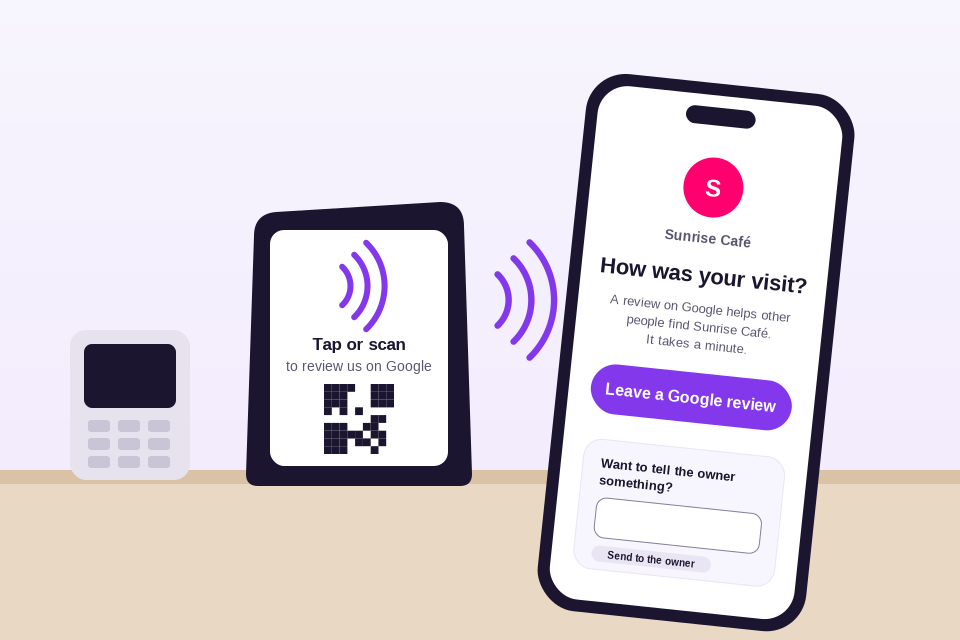
A printed QR card, or a Tillkeep stand
Most shops already have a card that says “scan to review us”. Here's what changes.
| Feature | Printed QR card | Tillkeep stand |
|---|---|---|
| Tap with a phone | No, scan only | Tap or scan |
| Change where it points | Print a new card | Change it in your account |
| See if it's being used | No way to know | Taps per stand, last 30 days |
| A private word with the owner | No | A note box under the Google button, never instead of it |
| Monthly fee | None | None |
After you pay
- Your account. We set up your Tillkeep account and send you a link to sign in. If you already use Tillkeep, the stands go on your shop.
- Set up and posted. We set up and test each stand for your shop, then post the kit from Swindon.
- Ready to tap. Sign in, paste your Google review link, and put the stands out. You see how many people tap each one.
Questions owners ask
Does it work on every phone?
iPhone XS and newer read the tag with a tap, and so do most Android phones with NFC turned on. Any phone with a camera can scan the QR code printed on the same stand.
Is there a monthly fee?
No. The stands keep working without one. Tillkeep loyalty and online ordering are separate, if you ever want them.
Does the stand post a review for the customer?
No. It opens your Google review page. The customer signs in to Google and writes the review themselves.
Can I change where a stand points?
Yes, in your Tillkeep account, with no reprinting. A stand can open your Google review page or your loyalty card.
Will I get more reviews?
Nobody can honestly promise a number. That's why you get your money back if your Google reviews haven't gone up 30 days after your kit arrives.
Can I give a discount for a review?
No. Rewarding reviews breaks Google's rules and UK law, and so does asking only happy customers. The stand shows every customer the same Google button.
Do I need a Google Business Profile?
Yes. The stand opens your profile's review page. A profile is free to set up with Google.
How is it delivered?
We post from Swindon to UK addresses, and UK postage is included in the price.
Read the stand shop terms for delivery, returns and the 30-day promise. Anything else, email hello@tillkeep.com.